Quick Takeaways
- Before any page can rank on Google it must pass through four stages — discovery, crawling, indexing, and ranking. A failure at any stage means the page won’t appear in search results.
- A misconfigured robots.txt file or an accidentally applied noindex tag can silently block pages from being indexed — with no error message to alert you.
- Slow load times affect crawling — Google may abandon slow pages before reading them fully, delaying or preventing indexing.
- Google Search Console is free and shows exactly which pages are indexed, which have errors, and why — check it regularly, not just at launch.
- New content that has no internal links pointing to it may take weeks to be discovered and indexed.
How Google Indexes Your Website — And Why It Matters for Small Businesses
How does Google index a website? It’s a question most small business owners never think to ask — until they discover a page that should be ranking isn’t appearing in search results at all.
Indexing is the prerequisite for everything else in SEO. Before a page can rank, before it can generate a single click of organic traffic, before it can do anything for your business — it has to be in Google’s index. And indexing isn’t guaranteed. It requires a technically healthy website, proper configuration, and the kind of ongoing attention that catches problems before they quietly cost rankings for months.
Understanding how Google indexes your website in plain terms gives you a clear picture of what needs to be in place for your content to have any chance of appearing in search results.
The Four Stages: Discovery, Crawling, Indexing, Ranking
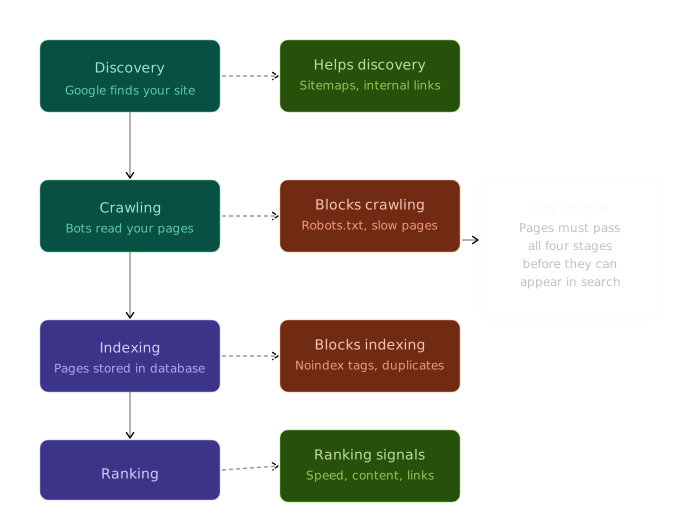
Before a page can rank it must pass through four distinct stages. A failure at any stage means the page doesn’t appear in search results — regardless of how strong the content is.
The diagram below shows how each stage works and what helps or blocks each one. Understanding where your site might be failing is the starting point for fixing it.
Stage 1 — How Google Discovers Your Website
Before Google can index a page it first has to find it. Discovery happens through two primary mechanisms — following links from other websites that point to yours, and reading XML sitemaps that tell Google which pages exist and should be indexed.
For a new website with no external links pointing to it, submitting a sitemap through Google Search Console is the most reliable way to ensure discovery happens quickly. Without it, new pages may not be discovered for weeks — delaying any ranking benefit they might eventually provide.
Internal links also play a critical role in discovery. When Google crawls one page on your site and finds links to other pages, it follows those links to discover the linked pages. Pages with no internal links pointing to them from other pages on the site may take significantly longer to be discovered — or may never be discovered at all if Google’s crawlers don’t happen to follow a path that leads there.
This is one of the most practical reasons internal linking strategy for small businesses matters beyond just user navigation. Every internal link is a discovery path for Google’s crawlers.
Stage 2 — How Google Crawls Your Website
Once Google discovers a page it sends a crawler — an automated program — to read that page’s content. The crawler reads the HTML, evaluates the structure, follows links to discover additional pages, and passes the information back to Google’s systems for processing.
The efficiency of this crawling process is directly affected by your site’s technical health. A fast website that responds quickly to requests gets crawled more efficiently than a slow one. Google allocates crawl budget — the resources it’s willing to spend crawling a given site — based on signals including site speed, update frequency, and overall quality. A slow site gets crawled less frequently, meaning new content takes longer to appear in results.
What blocks crawling is just as important to understand. A misconfigured robots.txt file can accidentally instruct Google’s crawlers not to access certain pages or sections of your site — blocking them from being indexed entirely. This is one of the most common technical SEO mistakes on small business websites, and one that often goes undetected for months.
Slow load times can also cause crawlers to abandon pages before reading them fully. A page that times out during a crawl attempt may be treated as if it doesn’t exist — another reason why is my website slow is a direct SEO concern, not just a user experience one.
Stage 3 — How Google Actually Indexes Your Website
Indexing is the process of storing a crawled page in Google’s database — the massive index of web pages Google draws from when generating search results. Once a page is indexed it’s eligible to appear in search results for relevant queries.
What prevents correct indexing is a distinct set of issues from what prevents crawling. A page can be successfully crawled but still not indexed correctly.
Noindex tags are the most direct indexing blocker. These are HTML tags that explicitly instruct Google not to index a page. They’re useful when intentionally applied — preventing checkout pages, internal search result pages, or admin pages from appearing in search results. They cause problems when accidentally applied to pages that should be indexed — which happens more often than most business owners realize, particularly when site migrations or template changes push noindex settings to pages that shouldn’t have them.
Duplicate content is another significant indexing complication. When multiple URLs serve the same or very similar content — a common issue on WordPress sites where category pages, tag pages, and post archives can generate duplicate content at scale — Google may choose to index only one version and ignore the others. Without canonical tags directing Google to the correct version, the wrong version may be indexed.
Understanding what is search visibility in the context of indexing shows why technical health is the foundation of visibility — pages that aren’t indexed correctly simply don’t exist from Google’s perspective, regardless of their content quality.
Stage 4 — How Google Ranks Indexed Pages
Once a page is indexed it becomes eligible to rank — but eligible is very different from actually ranking. Ranking is determined by hundreds of signals that Google evaluates to determine which indexed pages best answer a given search query.
Performance is one of the most direct and increasingly important ranking signals. Core Web Vitals for small business — the standardized metrics measuring loading speed, interactivity, and visual stability — are direct ranking factors. Pages with poor performance scores rank below comparable pages with strong scores.
Content relevance, internal linking structure, metadata quality, and the authority signals Google has accumulated about your site over time all feed into ranking alongside performance. None of these signals can compensate for a page that hasn’t made it through the first three stages — which is why discovery, crawling, and indexing need to be functioning correctly before any other SEO investment compounds effectively.
Why Indexing Issues Go Undetected on Small Business Websites
Indexing problems share a frustrating characteristic with most technical SEO issues — they’re invisible unless you specifically look for them.
A page that isn’t indexed doesn’t generate an error message. It doesn’t appear as broken. It simply doesn’t show up in search results — and if the business owner never had specific visibility on that page’s performance in search, they have no way of knowing the problem exists.
This is why why SEO starts with your website foundation emphasizes ongoing technical monitoring as a core component of SEO — not because the foundation is complicated, but because it requires someone actively looking at it to catch the problems that accumulate quietly over time.
How to Check Whether Google Has Indexed Your Website Correctly
Google Search Console is the most direct tool for monitoring indexing health — and it’s free for any website owner who has verified their site.
The Coverage report in Search Console shows which pages have been indexed, which have indexing errors, and which have been excluded and why. Errors worth addressing immediately include pages marked as “Submitted URL blocked by robots.txt” — pages in your sitemap that the robots.txt is blocking from crawling — and pages marked as “Noindexed” that should be indexed.
The URL Inspection tool allows you to check the indexing status of any specific URL — useful when a recently published page isn’t appearing in search results and you want to understand why.
Checking Search Console regularly — not just at launch but as the site evolves and new content is published — is the most reliable way to catch indexing issues before they affect search visibility for extended periods.
Explore the complete small business SEO guide for everything covered in this category. Browse all topics at Cindaro Insights to explore the full library.
Cindaro builds and manages websites for small businesses as an ongoing service — which means indexing health, crawl configuration, and technical SEO foundations are monitored continuously, not left to drift after launch day. See how it works or view our pricing.