

Quick Takeaways
- Heading tags (H1 to H6) label the titles and section headings on a page. They help Google and visitors understand what the page covers and how it’s organized.
- Use one H1 per page that says what the page is about, usually with your main keyword.
- Use H2s for main sections and H3s for subsections inside them, in order, like an outline.
- Write headings that describe the section. Use keywords where they fit naturally, but never stuff them in.
- Never pick a heading tag just to get a certain text size. Change the size with styling instead.
Heading tags help SEO by showing Google what a page is about and how its content is organized. Use one H1 for the page’s main topic, H2s for each main section, and H3s for subsections inside those, written in plain, descriptive language. Headings aren’t a powerful ranking factor on their own, but a clear structure helps Google understand the page, makes it easier to rank for related searches, and keeps visitors reading.
Below is how each heading level works, an example of a well-structured page, the most common mistakes on small business websites, and a checklist you can use on your own pages.
What Are Heading Tags?
Heading tags are HTML elements, <h1> through <h6>, that mark text as a heading. H1 is the top level and H6 is the lowest. On a website they look like bigger, bolder text, but what matters for SEO is the tag in the code, not how the text looks.
Think of them as a table of contents. The H1 is the title of the book, H2s are the chapters, and H3s are the sections inside each chapter. Search engines and screen readers use that outline to understand the page without reading every word.
| Tag | What it’s for | How many per page |
|---|---|---|
| H1 | The page’s main title and topic | One |
| H2 | Main sections of the page | As many as you need |
| H3 | Subsections inside an H2 | As many as you need |
| H4–H6 | Deeper levels on long, detailed pages | Rarely needed |
Do Heading Tags Help SEO?
Yes, but not because Google gives points for having them. Google has said headings help it understand the content of a page, and that’s where the benefit comes from:
- They show Google the topic. A clear H1 and descriptive H2s confirm what the page is about and which questions it answers.
- They help you rank for more searches. Each H2 covers a subtopic, so a well-organized page can show up for many related questions, not just its main keyword.
- They can earn featured snippets. Google often pulls a heading phrased as a question, plus the paragraph or list under it, into the answer box at the top of results.
- They keep visitors on the page. Most people scan before they read. Clear headings let them find what they came for instead of hitting the back button.
- They make the page accessible. Screen reader users jump from heading to heading to navigate a page, so a logical heading order matters for them too.
How to Use H1, H2, and H3 Tags for SEO
H1: one clear page title
The H1 tells visitors and Google what the page is about. Make it specific, and include the main keyword naturally. “Welcome to Our Website” says nothing; “Emergency Plumbing in Fort Worth” says exactly what the page offers and where.
The H1 is usually close to your title tag, but they don’t have to match. The title tag is what shows in Google’s results, so it can be shorter and more clickable. See how long a title tag and meta description should be.
H2: the main sections
Each H2 starts a main section of the page. Together, your H2s should read like a summary of everything the page covers. Phrasing some of them the way people search, like “How Much Does a Website Cost?”, helps you show up for those questions.
H3 to H6: subsections
Use an H3 to break an H2 section into smaller parts, like steps, options, or examples. Go deeper with H4 only on long, detailed pages. Most small business pages never need H5 or H6.
Heading Structure Example
Here’s the heading outline for a typical small business service page:
H1: Roof Repair in Denver
  H2: Roof Repair Services We Offer
    H3: Leak Repair
    H3: Storm and Hail Damage
    H3: Shingle Replacement
  H2: How Much Does Roof Repair Cost?
  H2: Why Denver Homeowners Choose Us
  H2: Frequently Asked Questions
    H3: Will insurance cover my roof repair?
    H3: How long does a roof repair take?
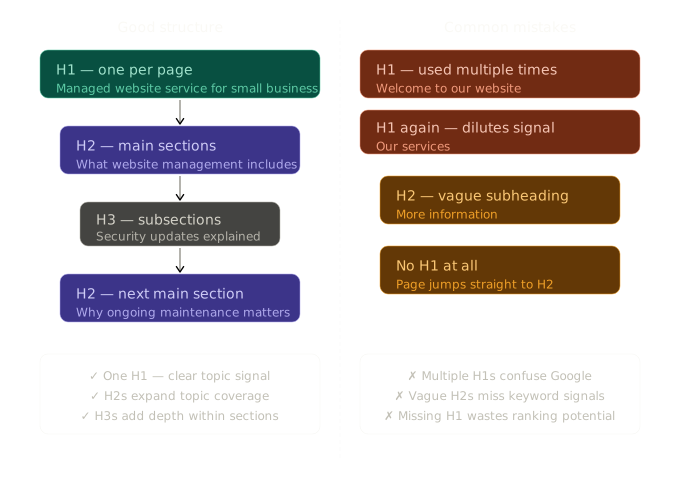
Someone who only read the headings would still know what the page offers, where, and what questions it answers. That’s the test of a good structure. The diagram below shows the same idea next to the most common mistakes:
Common Heading Mistakes on Small Business Websites
- No H1 at all, often because the page builder made the logo or hero text a plain paragraph.
- Several H1s for things like the logo, a slogan, and the page title. Google has said multiple H1s won’t hurt rankings, but one H1 gives the clearest signal about the page’s topic.
- Vague headings like “About,” “More Information,” or “Welcome” that don’t describe the section.
- Picking tags for their size. Using an H5 because it looks small, or an H1 because it looks big, scrambles the outline. Change the font size in your design settings and keep the tags in order.
- Skipping levels, like jumping from H2 straight to H4. It isn’t a ranking problem, but it confuses screen readers and the page outline.
- Keyword stuffing, like “Plumber Denver | Denver Plumber | Best Plumber in Denver.” It reads badly, and Google ignores or discounts it.
- Headings in images, where the text is part of a picture. Search engines can’t read it as a heading.
- Headings in headers, footers, and sidebars, like a footer “Contact Us” set as an H2. It adds the same heading to every page. Use regular text for these.
How Many H1 Tags Should a Page Have?
One. Google has said a page with more than one H1 won’t be penalized, and some themes use several. But one H1 that matches the page’s topic is the simplest and clearest setup, and it’s what most SEO tools check for. There’s no limit on H2s and H3s. Use as many as the content needs.
How to Check Your Heading Tags
- Use a browser extension. Free extensions like HeadingsMap or Detailed SEO Extension show a page’s full heading outline in one click.
- Check your SEO plugin. SureRank, Yoast, and Rank Math flag a missing H1 or a keyword missing from your headings.
- Inspect the page. Right-click a heading, choose Inspect, and check whether the code says h1, h2, or h3.
- Run a site audit. Tools like Screaming Frog (free up to 500 pages) list every page with a missing or duplicate H1.
Heading Tag Checklist
| Check | Why it matters |
|---|---|
| One H1 that says what the page is about | Clearest topic signal for Google and visitors |
| Main keyword in the H1, worded naturally | Confirms the page matches the search |
| H2s for every main section | Shows the full scope of the page |
| H3s only inside an H2 | Keeps the outline in order |
| Some headings phrased as questions people ask | Can rank for those questions and win snippets |
| Tags chosen for structure, not size | Keeps the outline correct |
| No headings in header, footer, or sidebar | Avoids repeated, off-topic headings |
| Headings make sense when read alone | The test of a clear structure |
Other Page Structure Basics
Headings are the biggest part of on-page structure, but three other things work with them:
- Short, descriptive URLs. Use lowercase words separated by hyphens, like
/roof-repair-denver/. Google recommends hyphens over underscores. Decide on URLs before launch; changing them later needs redirects. - Internal links inside your sections. A link to a related page placed in the relevant section tells Google how your pages connect. See internal linking for small businesses.
- Alt text on images. A short description of each image helps search engines and screen readers understand it.
Structure is one of many things Google keeps re-evaluating, which is part of why Google rankings keep changing. Checking headings on new pages, and auditing older ones now and then, keeps small mistakes from building up.
Frequently Asked Questions
What are H1, H2, and H3 tags?
They’re HTML heading tags. H1 is the page’s main title, H2s mark the main sections, and H3s mark subsections inside an H2. Together they form an outline of the page.
Are heading tags a ranking factor?
Not a strong one on their own. Google uses headings to understand what a page and its sections are about, which helps it match the page to the right searches. The benefit comes from clarity, not from simply having the tags.
Should my H1 be the same as my title tag?
It can be, but it doesn’t have to. Both should describe the same topic. The title tag appears in search results and can be shorter or more clickable; the H1 is the headline visitors see on the page.
Should I put keywords in my headings?
Yes, where they fit naturally. Put the main keyword in the H1 and related phrases in some H2s. Repeating the same keyword in every heading reads badly and doesn’t help.
When should I use H4, H5, and H6?
Only on long, detailed pages that need more levels inside an H3. Most small business pages only need H1, H2, and H3.
Explore the complete small business SEO guide for everything covered in this category, or browse all topics at Cindaro Resources.
Cindaro builds and manages websites for small businesses as an ongoing service, so every page launches with a clean heading structure, descriptive URLs, and the basics set up correctly. See how it works or view our pricing.