
Quick Takeaways
- A website care plan is a monthly service that keeps your site updated, backed up, secure and working, so problems are prevented instead of fixed after the fact.
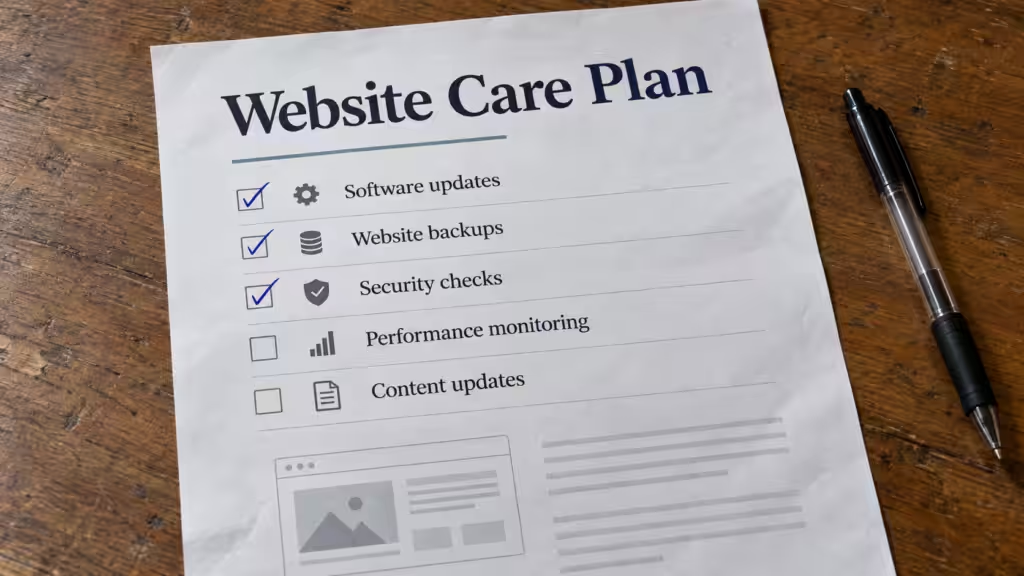
- Every care plan should include software updates, daily backups, security monitoring, uptime monitoring and a set amount of support time.
- Most small businesses pay about $35–$100 a month for a basic plan and $100–$300 a month for a plan that includes content changes and SEO help.
- A WordPress care plan matters most, because WordPress sites rely on plugins and themes that need regular, careful updates.
- Watch for vague plans: no backup restore testing, no stated response time, and “unlimited” support with no definition.
A website care plan is an ongoing monthly service where a professional keeps your website updated, backed up, secure and running smoothly. A good plan includes software updates, daily off-site backups, security and uptime monitoring, performance checks, and a set amount of time for small changes or support each month. Most small businesses pay $35–$300 a month depending on how much hands-on help is included.
Think of it like a service plan for your car or your HVAC system: regular, scheduled care that costs less than emergency repairs. This guide covers what a care plan should include, how the common tiers compare, and how to tell a good plan from one that just sends you an invoice.
What Is a Website Care Plan?
A website care plan (also called a website maintenance plan or WordPress care plan) is a subscription for the upkeep of your website. Instead of calling a developer when something breaks, you pay a predictable monthly fee and someone checks, updates and protects the site on a schedule.
Care plans exist because websites aren’t “done” at launch. Software needs updates, security threats change, backups need to run, and content goes out of date. See why websites need ongoing maintenance for what happens when nobody is responsible for this.
What’s Included in a Website Care Plan?
Plans vary, but these are the services you should expect, from the essentials every plan needs to the extras that separate a basic plan from a full-service one.
The essentials (every plan should include these)
- Software updates: WordPress core, plugin and theme updates, tested so they don’t break the site. See how to update WordPress plugins safely.
- Daily off-site backups: stored somewhere other than your web server, with a tested way to restore them. See how to back up a WordPress site.
- Security monitoring: malware scanning, a firewall, login protection, and cleanup if something gets through.
- Uptime monitoring: automatic alerts when the site goes down, and someone who acts on them. See what to do when your website is down.
- A monthly report: what was updated, backed up and fixed, in plain language.
Common extras (in mid-tier and premium plans)
- Content changes: a set number of minutes or hours each month for text, photo, price or page updates.
- Performance optimization: keeping load times fast as the site grows. See Core Web Vitals.
- Hosting: some plans include managed hosting so one company is responsible for the whole stack.
- SEO health checks: monitoring Search Console, fixing errors, and keeping titles and pages in order. See the small business SEO checklist.
- Priority support: faster response times and emergency fixes.
What usually isn’t included
New pages, redesigns, new features, copywriting and marketing campaigns are normally quoted separately. Check how the plan handles requests that go beyond its included time. For bigger projects, here’s what a website redesign costs in 2026.
Website Care Plan Tiers Compared
Most providers sell care plans in three tiers. Names and prices vary, but the pattern is consistent:
| Tier | Typical monthly cost | What’s usually included | Best for |
|---|---|---|---|
| Basic | $35–$100 | Updates, daily backups, security and uptime monitoring, monthly report | Simple sites that rarely change |
| Standard | $100–$200 | Everything in Basic, plus 30–60 minutes of content changes, performance checks, faster support | Most small business sites |
| Premium | $200–$300+ | Everything in Standard, plus more support time, SEO health checks, priority response, often hosting | Sites that bring in leads or sales every day |
For a detailed cost breakdown by type of website, including WordPress and yearly costs, see how much website maintenance costs.
WordPress Care Plans: Why They Matter Most
Every platform needs some upkeep, but WordPress needs the most attention. A typical WordPress business site runs 15–30 plugins plus a theme, each updated on its own schedule by a different developer. Updates fix security holes, but an untested update can also break a form, a layout or the whole site.
A WordPress care plan handles that balance: applying updates promptly, testing them (ideally on a staging copy first), and rolling back when something goes wrong. That’s why most care plans on the market are built around WordPress.
Sites on Wix or Squarespace get platform updates automatically, so a care plan there focuses on content, SEO and support rather than software updates. See WordPress vs Wix vs Squarespace for how the platforms differ.
Do You Need a Website Care Plan?
You probably do if any of these are true:
- Your website is on WordPress and nobody is updating it every week
- Your site brings in calls, bookings or sales you’d notice losing
- You don’t know when your last backup was, or whether it would restore
- You only hear about problems when a customer tells you
- You’re spending your own evenings fixing or updating the site
You may not need one if your site is a simple page on a hosted builder, rarely changes, and doesn’t bring in business, though even then someone should check it monthly.
Care Plan vs Hosting vs a Managed Website
These three get mixed up, and many owners end up paying for overlapping services or assuming something is covered when it isn’t.
| Service | What it covers | What it doesn’t |
|---|---|---|
| Web hosting | The server your site lives on, and sometimes server-level backups | Plugin updates, fixes, content changes, support for the site itself |
| Care plan | Updates, backups, security, monitoring and small changes on an existing site | Usually hosting, redesigns and new features |
| Managed website service | Design, hosting, care, updates and content changes from one provider for one monthly fee | Usually large custom projects outside the plan |
If you’d rather have one company responsible for everything, read website as a service (WaaS) and what website management includes.
Red Flags in a Website Care Plan
- Backups with no restore testing. A backup you’ve never restored is a guess.
- “Unlimited support” with no definition. Ask what it covers and how fast they respond.
- Updates applied automatically with no testing. That’s how plugin updates break sites.
- No monthly report. If you can’t see the work, you can’t tell whether it’s being done.
- You don’t have admin access to your own site. You should always own your site, domain and logins.
- Long contracts with no clear exit terms. Know how you get your site and data back if you leave.
Questions to Ask Before You Choose a Care Plan
- How often do you update plugins and themes, and do you test updates before applying them?
- Where are backups stored, how long are they kept, and when did you last test a restore?
- How quickly do you respond if the site goes down or gets hacked? Is hack cleanup included?
- How much time for content changes is included, and what happens when I need more?
- What does the monthly report show?
- Is hosting included, or do I pay for it separately?
- If I cancel, how do I get my site, backups and logins?
Website Care Plan FAQs
What is a website care plan?
A monthly service where a professional keeps your website updated, backed up, secure and working, with a set amount of support for small changes.
How much does a website care plan cost?
Most small businesses pay $35–$100 a month for a basic plan and $100–$300 a month for plans that include content changes, SEO checks and priority support.
What’s the difference between a care plan and website maintenance?
They mean nearly the same thing. “Care plan” usually describes a packaged monthly service with set tiers, while “maintenance” can also mean one-off fixes or tasks you do yourself.
Is a WordPress care plan worth it?
For most business sites, yes. One hacked site, failed update or lost backup typically costs more to fix than a year of care, and a care plan also saves you the time of doing the updates yourself.
Does my hosting company maintain my website?
Usually not. Most hosts keep the server running but don’t update your plugins, fix broken pages or make content changes. Check exactly what your hosting plan includes.
Can I do website maintenance myself?
Yes, if you have the time and are careful about testing updates. Use the website maintenance checklist to stay on schedule.
Browse the website management guide or all topics at Cindaro Resources.
Cindaro builds and manages websites for small businesses for a flat monthly fee. Design, hosting, security, updates and content changes are all included, so there’s nothing to piece together. See how it works or view our pricing.